Inspect Rich Documents with Gemini Multimodality and Multimodal RAG
과정 중 두번째
2. Using Gemini for Multimodal Retail Recommendations
(소매업을 위한 멀티모달 추천에 Gemini 사용)
개요
Gemini는 Google DeepMind에서 개발한 생성형 AI 모델 제품군으로, 멀티모달 사용 사례를 위해 설계되었습니다.
소매업체의 경우 추천 시스템을 사용하면 고객 경험을 개선하여 결과적으로 매출 향상을 달성할 수 있습니다. 이 실습에서는 Gemini 모델을 사용하여 멀티모달 추천 시스템을 신속하게 생성하는 방법을 알아봅니다. Gemini 모델은 멀티모달 모델을 사용하여 추천과 설명을 모두 제공할 수 있습니다.
이 실습에서는 장면(예: 거실)으로 시작해 Gemini 모델을 사용하여 시각적 이해를 수행해 봅니다. 또한 Gemini 모델을 사용하여 입력값인 가구 목록에서 품목(예: 의자)을 추천받는 방법을 살펴봅니다.
목표
주요 목표는 멀티모달 모델인 Gemini 2.0을 사용하여 추천과 설명을 모두 제공할 수 있는 추천 시스템을 만드는 방법을 배우는 것입니다.
이 노트북에서는 장면(예: 거실)으로 시작하여 Gemini 모델을 사용해 시각적 이해를 수행합니다. 또한 Gemini 모델이 입력으로 제공된 가구 아이템 목록에서 아이템(예: 의자)을 추천하는 데 어떻게 사용될 수 있는지 살펴볼 것입니다.
이 노트북을 통해 다음을 배우게 됩니다:
- Gemini 모델을 사용하여 시각적 이해를 수행하는 방법
- Gemini 모델의 프롬프트에서 멀티모달 기능을 고려하는 방법
- Gemini 모델이 즉시 사용 가능한 소매 추천 애플리케이션을 만드는 데 어떻게 사용될 수 있는지
실습 개요
- 소매 회사들에게 추천 시스템은 고객 경험을 향상시키고 따라서 매출을 증가시킬 수 있습니다.
- Gemini 2.0 모델의 멀티모달 기능을 사용하여 즉시 사용 가능한 멀티모달 추천 시스템을 빠르게 만들 수 있습니다.
시나리오
- 고객 사진
 |
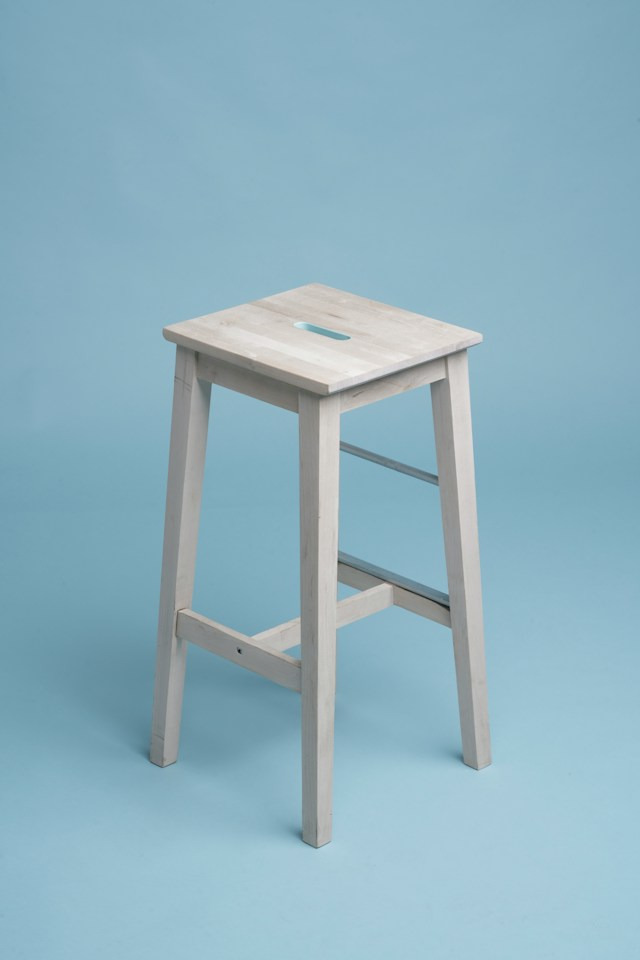
- 다음은 고객이 선택을 고민하고 있는 네 가지 의자 옵션입니다:
| 의자 1 | 의자 2 | 의자 3 | 의자 4 |
|---|---|---|---|
 |
 |
 |
 |
실습 셋팅과정들인
'실습 시작 버튼을 클릭하기 전에',
'실습을 시작하고 Google Cloud 콘솔에 로그인하는 방법'
'작업 1. Vertex AI Workbench에서 노트북 열기' = 'Task 1. Open the notebook in Vertex AI Workbench'
'작업 2. 노트북 설정하기',
'작업 3. Gemini Flash 모델 사용하기'
👆 들은 모두 여기에 설명되어 있습니다.
실습 시작
1. Getting Started
1) Install Gen AI SDK for Python
%pip install --upgrade google-genaiㄴ> 실행 결과 :
Requirement already satisfied: google-genai in /opt/conda/lib/python3.10/site-packages (1.32.0)
Requirement already satisfied: anyio<5.0.0,>=4.8.0 in /opt/conda/lib/python3.10/site-packages (from google-genai) (4.10.0)
Requirement already satisfied: google-auth<3.0.0,>=2.14.1 in /opt/conda/lib/python3.10/site-packages (from google-genai) (2.40.3)
Requirement already satisfied: httpx<1.0.0,>=0.28.1 in /opt/conda/lib/python3.10/site-packages (from google-genai) (0.28.1)
Requirement already satisfied: pydantic<3.0.0,>=2.0.0 in /opt/conda/lib/python3.10/site-packages (from google-genai) (2.11.7)
Requirement already satisfied: requests<3.0.0,>=2.28.1 in /opt/conda/lib/python3.10/site-packages (from google-genai) (2.32.5)
Requirement already satisfied: tenacity<9.2.0,>=8.2.3 in /opt/conda/lib/python3.10/site-packages (from google-genai) (9.1.2)
Requirement already satisfied: websockets<15.1.0,>=13.0.0 in /opt/conda/lib/python3.10/site-packages (from google-genai) (15.0.1)
Requirement already satisfied: typing-extensions<5.0.0,>=4.11.0 in /opt/conda/lib/python3.10/site-packages (from google-genai) (4.15.0)
Requirement already satisfied: exceptiongroup>=1.0.2 in /opt/conda/lib/python3.10/site-packages (from anyio<5.0.0,>=4.8.0->google-genai) (1.3.0)
Requirement already satisfied: idna>=2.8 in /opt/conda/lib/python3.10/site-packages (from anyio<5.0.0,>=4.8.0->google-genai) (3.10)
Requirement already satisfied: sniffio>=1.1 in /opt/conda/lib/python3.10/site-packages (from anyio<5.0.0,>=4.8.0->google-genai) (1.3.1)
Requirement already satisfied: cachetools<6.0,>=2.0.0 in /opt/conda/lib/python3.10/site-packages (from google-auth<3.0.0,>=2.14.1->google-genai) (5.5.2)
Requirement already satisfied: pyasn1-modules>=0.2.1 in /opt/conda/lib/python3.10/site-packages (from google-auth<3.0.0,>=2.14.1->google-genai) (0.4.2)
Requirement already satisfied: rsa<5,>=3.1.4 in /opt/conda/lib/python3.10/site-packages (from google-auth<3.0.0,>=2.14.1->google-genai) (4.9.1)
Requirement already satisfied: certifi in /opt/conda/lib/python3.10/site-packages (from httpx<1.0.0,>=0.28.1->google-genai) (2025.8.3)
Requirement already satisfied: httpcore==1.* in /opt/conda/lib/python3.10/site-packages (from httpx<1.0.0,>=0.28.1->google-genai) (1.0.9)
Requirement already satisfied: h11>=0.16 in /opt/conda/lib/python3.10/site-packages (from httpcore==1.*->httpx<1.0.0,>=0.28.1->google-genai) (0.16.0)
Requirement already satisfied: annotated-types>=0.6.0 in /opt/conda/lib/python3.10/site-packages (from pydantic<3.0.0,>=2.0.0->google-genai) (0.7.0)
Requirement already satisfied: pydantic-core==2.33.2 in /opt/conda/lib/python3.10/site-packages (from pydantic<3.0.0,>=2.0.0->google-genai) (2.33.2)
Requirement already satisfied: typing-inspection>=0.4.0 in /opt/conda/lib/python3.10/site-packages (from pydantic<3.0.0,>=2.0.0->google-genai) (0.4.1)
Requirement already satisfied: charset_normalizer<4,>=2 in /opt/conda/lib/python3.10/site-packages (from requests<3.0.0,>=2.28.1->google-genai) (3.4.2)
Requirement already satisfied: urllib3<3,>=1.21.1 in /opt/conda/lib/python3.10/site-packages (from requests<3.0.0,>=2.28.1->google-genai) (2.5.0)
Requirement already satisfied: pyasn1>=0.1.3 in /opt/conda/lib/python3.10/site-packages (from rsa<5,>=3.1.4->google-auth<3.0.0,>=2.14.1->google-genai) (0.6.1)
Note: you may need to restart the kernel to use updated packages.
ㄴ > requirements.txt 파일 내용
| google-cloud-bigquery==3.25.0 google-cloud-pipeline-components==2.15.0 google-cloud-aiplatform==1.74.0 pandas==2.2.2 kfp==2.7.0 numpy>=1.22.4,<2.0.0 matplotlib==3.8.0 langchain==0.3.8 torch==2.1.0 tensorflow==2.17.0 |
2) Restart current runtime
To use the newly installed packages in this Jupyter runtime, you must restart the runtime. You can do this by running the cell below, which will restart the current kernel.
# Restart kernel after installs so that your environment can access the new packages
import IPython
app = IPython.Application.instance()
app.kernel.do_shutdown(True)
ㄴ> 실행결과 :
{'status': 'ok', 'restart': True}
3) Authenticate your notebook environment (Colab only)
ㄴ> 코드랩 환경이 아니므로 건너뛰었습니다.
2. 'Task 2. Set up the notebook'
2-1) Define Google Cloud project information and initialize Vertex AI
- 프로젝트용 Python Vertex AI SDK를 초기화
# Use the environment variable if the user doesn't provide Project ID. (사용자가 프로젝트 ID를 제공하지 않으면 환경 변수를 사용합니다.)
import os

from google import genai

PROJECT_ID = "[your-project-id]"  # @param {type: "string", placeholder: "[your-project-id]", isTemplate: true}
if not PROJECT_ID or PROJECT_ID == "[your-project-id]":
    PROJECT_ID = str(os.environ.get("GOOGLE_CLOUD_PROJECT"))

LOCATION = os.environ.get("GOOGLE_CLOUD_REGION", "us-central1")

client = genai.Client(vertexai=True, project=PROJECT_ID, location=LOCATION)
2-2) Import libraries
from google.genai.types import GenerateContentConfig, Part
- GenerateContentConfig, Part 두 라이브러리는 Gemini API로 보내는 요청의 세부 설정과 내용물을 구성하는 데 사용됩니다.
| 1. GenerateContentConfig - Gemini 모델이 콘텐츠를 생성하는 방식을 제어하는 설정값들을 묶어놓은 것입니다. - 모델의 창의성, 답변 길이, 특정 단어에서 멈추는 규칙 등을 정할 수 있습니다.
|
| 2. Part - 이것은 모델에게 보내는 콘텐츠의 기본 단위입니다. - 프롬프트(요청)는 하나 이상의 Part 객체들로 구성됩니다. - Part는 텍스트뿐만 아니라 이미지, 오디오, 비디오 등 다양한 유형의 데이터를 담을 수 있어 멀티모달 기능을 구현하는 데 핵심적인 역할을 합니다.
|
3. 'Task 3. Use the Gemini model'
3-1) Using Gemini model
MODEL_ID = "gemini-2.0-flash"
4. 'Task 4. Generate open recommendations based on built-in knowledge'
4-1) Gemini를 활용한 시각적 이해
ex0) 여기서는 Gemini 모델에게 방의 이미지를 보고 세부적으로 설명하도록 요청합니다.
이를 위해서는 텍스트와 이미지를 하나의 프롬프트에 결합해야 합니다.

prompt = "이 방에서 보이는 것과 전반적인 분위기를 설명해 주세요:"
# urls for room images
room_image_url = "https://storage.googleapis.com/github-repo/img/gemini/retail-recommendations/rooms/spacejoy-c0JoR_-2x3E-unsplash.jpg"
room_image = Part.from_uri(file_uri=room_image_url, mime_type="image/jpeg")

prompt = "Describe what's visible in this room and the overall atmosphere:"
contents = [
    room_image,
    prompt,
]

responses = client.models.generate_content_stream(model=MODEL_ID, contents=contents)

print("\n-------Response--------")
for response in responses:
    print(response.text, end="")
ㄴ> 실행결과 :
객실은 중립적인 색상 팔레트와 자연스러운 질감이 특징인 차분하고 매력적인 분위기를 자아냅니다. 왼쪽에는 안락의자가 있고, 바닥에는 둥근 오토만과 양가죽 러그가 깔려 있습니다. 모던한 스타일의 소파가 프레임 중앙에 놓여 있으며, 다양한 쿠션과 드레이프 드레이프 담요로 장식되어 있습니다. 소파 위 벽에는 두 개의 장식용 둥근 거울이 걸려 있습니다. 소파 앞에는 꽃병과 책으로 장식된 커피 테이블이 있습니다. 소파 근처에는 장식용 식물이 꽂힌 키 큰 꽃병이 있어 높이감과 자연의 느낌을 더합니다. 오른쪽 배경에는 바구니 모양의 플로어 램프가 공간을 밝게 비춥니다. 전체적인 분위기는 편안함과 천연 소재를 강조한 편안하고 우아한 분위기입니다.
4-2) 내장된 지식을 기반으로 오픈 추천 생성
ex1) 동일한 이미지를 사용하여 방 설명과 함께 잘 어울릴 가구를 추천하도록 모델에 요청해보자.
- 참고로 이 경우 모델이 추천할 가구를 선택할 수 있으며 내장된 지식으로만 가구를 선택할 수 있다는 점에 유의
prompt1 = "이 방에 맞는 새 가구를 추천해 주세요."
prompt2 = "그리고 그 이유를 자세히 설명해 주세요."
prompt1 = "Recommend a new piece of furniture for this room:"
prompt2 = "and explain the reason in detail"
contents = [prompt1, room_image, prompt2]

responses = client.models.generate_content_stream(model=MODEL_ID, contents=contents)

print("\n-------Response--------")
for response in responses:
    print(response.text, end="")
ㄴ> 실행결과 :
Okay, based on the image and the existing furniture and decor, I recommend adding a **console table** behind the sofa.
Here's why:
* **Enhances the Aesthetic:** A slim console table would complement the existing decor by adding another layer of visual interest. It can mirror the sofa's length for symmetry, or be a few inches shorter for a clean look
* **Extra Surface Area:** A console table would provide extra display space for decorative items.
By selecting a piece of furniture with a similar color, we could improve the harmony of the room.
In the next cell, you will ask the model to recommend a type of chair that would fit in it alongside with the description of the room.
Note that the model can choose any type of chair to recommend in this case.
----
좋아요, 이미지와 기존 가구 및 장식을 고려하여 소파 뒤에 **콘솔 테이블**을 추가하는 것을 추천합니다.
이유는 다음과 같습니다.
* **미적 감각 향상:** 슬림한 콘솔 테이블은 기존 장식과 조화를 이루며 시각적인 흥미를 더합니다. 소파 길이와 대칭을 이루도록 하거나, 몇 인치 짧게 하여 깔끔한 느낌을 줄 수 있습니다.
* **넓은 표면적:** 콘솔 테이블은 장식품을 위한 추가 전시 공간을 제공합니다.
비슷한 색상의 가구를 선택하면 방의 조화를 더할 수 있습니다.
다음 셀에서는 모델에게 방에 대한 설명과 함께 적합한 의자 유형을 추천해 달라고 요청합니다.
이 경우 모델은 어떤 유형의 의자든 추천할 수 있습니다.
ex2) 다음 셀에서는 모델에게 방 설명과 함께 방에 맞는 의자 유형을 추천해 달라고 요청합니다.
- 이 경우 모델은 어떤 유형의 의자든 추천할 수 있습니다.
prompt1 = "이 방을 설명해 주세요:"
prompt2 = "그리고 방에 맞는 의자 유형을 추천해 주세요"
prompt1 = "Describe this room:"
prompt2 = "and recommend a type of chair that would fit in it"
contents = [prompt1, room_image, prompt2]

responses = client.models.generate_content_stream(model=MODEL_ID, contents=contents)

print("\n-------Response--------")
for response in responses:
    print(response.text, end="")
ㄴ> 실행결과 :
The room is decorated in a neutral, minimalist style with natural textures. The walls are light beige, and the floor is a light brown wood with a large, textured beige rug covering most of the space. The furniture includes a light gray sofa adorned with beige pillows and a beige throw blanket. Above the sofa, two round mirrors with straw-like frames are mounted on the wall. To the left of the sofa is a tall white vase holding feathery beige pampas grass.
A rounded, light beige armchair with a matching round pillow sits in the corner, complemented by a round ottoman and a sheepskin rug. A round white coffee table with wooden legs stands in the center of the room, holding a vase, books, and a bowl. In the corner, next to the sofa, is a floor lamp with a beige shade and a wooden stand with a white accent, as well as a wicker basket-shaped planter.
**Chair Recommendation:**
Given the room's aesthetic, a comfortable accent chair would be a great addition. Here's a suggestion:
* **A Rattan or Wicker Accent Chair:** This would complement the natural, textural elements already present in the room. Look for one with a simple, clean design and light beige cushions to maintain the color palette. The natural material would continue the room's organic, relaxed vibe.
----
객실은 자연스러운 질감을 살린 중립적이고 미니멀한 스타일로 꾸며져 있습니다. 벽은 밝은 베이지색이고, 바닥은 밝은 갈색 원목이며, 공간 대부분을 덮고 있는 크고 질감 있는 베이지색 러그가 있습니다. 가구로는 베이지색 베개와 베이지색 스로우 블랭킷으로 장식된 밝은 회색 소파가 있습니다. 소파 위 벽에는 밀짚 모양의 프레임이 있는 두 개의 둥근 거울이 설치되어 있습니다. 소파 왼쪽에는 깃털처럼 부드러운 베이지색 팜파스 그래스가 담긴 키 큰 흰색 꽃병이 있습니다.
모퉁이에는 둥근 모양의 밝은 베이지색 안락의자와 그에 어울리는 둥근 베개가 놓여 있으며, 둥근 오토만과 양가죽 러그가 그 분위기를 더욱 돋보이게 합니다. 방 중앙에는 나무 다리가 달린 둥근 흰색 커피 테이블이 놓여 있으며, 그 위에는 꽃병, 책, 그릇이 놓여 있습니다. 소파 옆 모퉁이에는 베이지색 전등갓이 있는 플로어 램프와 흰색 포인트가 있는 원목 스탠드, 그리고 고리버들 바구니 모양의 화분이 있습니다.
**의자 추천:**
방의 미적 감각을 고려하여 편안한 포인트 의자가 훌륭한 추가 요소가 될 것입니다. 제안해 드리겠습니다.
* **라탄이나 위커 악센트 의자:** 이 의자는 방에 이미 존재하는 자연스럽고 질감 있는 요소들과 잘 어울립니다. 심플하고 깔끔한 디자인에 밝은 베이지색 쿠션을 사용하여 전체적인 색상 팔레트를 유지하는 의자를 선택하세요. 천연 소재는 방의 유기적이고 편안한 분위기를 이어갈 것입니다.
5. 'Task 5. Generate recommendations based on provided images'
5-1) 제공된 이미지 기반 추천 생성
ex3) 열려 있는 추천 대신 모델에 목록을 제공하여 선택 범위를 제한할 수도 있습니다. 이 섹션에서는 몇 가지 의자 이미지를 다운로드하고 Gemini 모델이 추천에 사용할 수 있는 옵션으로 설정해 봅니다.
- 이 기능은 매장의 공간 유형과 판매 품목을 기반으로 사용자에게 추천을 제공하려는 소매업체에 특히 유용합니다.
 |
 |
 |
 |
|---|
contents = [
"다음 의자들을 고려해 보세요:",
"chair 1:",
furniture_images[0],
"chair 2:",
furniture_images[1],
"chair 3:",
furniture_images[2],
"chair 4:",
furniture_images[3],
"room:",
room_image,
"당신은 인테리어 디자이너입니다. 각 의자가 방의 스타일에 적합한지 설명해 보세요:",
]
# Download and display sample chairs
furniture_image_urls = [
    "https://storage.googleapis.com/github-repo/img/gemini/retail-recommendations/furnitures/cesar-couto-OB2F6CsMva8-unsplash.jpg",
    "https://storage.googleapis.com/github-repo/img/gemini/retail-recommendations/furnitures/daniil-silantev-1P6AnKDw6S8-unsplash.jpg",
    "https://storage.googleapis.com/github-repo/img/gemini/retail-recommendations/furnitures/ruslan-bardash-4kTbAMRAHtQ-unsplash.jpg",
    "https://storage.googleapis.com/github-repo/img/gemini/retail-recommendations/furnitures/scopic-ltd-NLlWwR4d3qU-unsplash.jpg",
]

# Load furniture images as Part Objects
furniture_images = [
    Part.from_uri(file_uri=url, mime_type="image/jpeg") for url in furniture_image_urls
]

# To recommend an item from a selection, you will need to label the item number within the prompt.
# That way you are providing the model with a way to reference each image as you pose a question.
# Labelling images within your prompt also help to reduce hallucinations and overall produce better results.
contents = [
    "Consider the following chairs:",
    "chair 1:",
    furniture_images[0],
    "chair 2:",
    furniture_images[1],
    "chair 3:",
    furniture_images[2],
    "chair 4:",
    furniture_images[3],
    "room:",
    room_image,
    "You are an interior designer. For each chair, explain whether it would be appropriate for the style of the room:",
]

responses = client.models.generate_content_stream(model=MODEL_ID, contents=contents)

print("\n-------Response--------")
for response in responses:
    print(response.text, end="")
ㄴ> 실행결과 :
더보기
-------답변--------
좋아요, 각 의자를 분석해서 알려주신 방의 스타일과 얼마나 잘 어울리는지 살펴보겠습니다.
**전반적인 방 스타일:**
이 방은 모던하고 중립적이며, 자연스러운 소재와 질감에 중점을 둔 보헤미안적인 스타일로 보입니다. 색상 팔레트는 매우 밝고 경쾌하며, 오프 화이트, 크림색, 갈색, 그리고 자연스러운 원목 톤이 어우러져 있습니다. 유기적인 형태와 질감이 강조되어 있으며, 둥근 거울, 직조 러그, 말린 꽃꽂이가 보헤미안적인 분위기를 더합니다.
**의자 분석:**
* **의자 1:** 이 의자는 금속 프레임과 높이 조절이 가능한 인더스트리얼한 느낌을 줍니다. 이 의자는 이 방에 어울리지 않을 것 같습니다. 색상 팔레트와 어울리지 않고, 금속은 전체적인 미적 감각에 적합하지 않습니다.
* **의자 2:** 이 의자는 단추 장식이 있는 전통적인 안락의자입니다. 이 의자는 이 방에 어울릴 것 같습니다. 벽과 같은 색이고, 방에 이미 비슷한 스타일의 의자들이 몇 개 있는 것 같습니다.
* **의자 3:** 이 의자는 모던하고 미니멀하며 약간은 소박한 느낌을 줍니다. 소재는 테마에 어울리지만, 전반적으로 이 의자는 이 방에는 잘 어울리지 않습니다. 딱딱한 기하학적 형태이고 독특한 스타일이 아니기 때문입니다.
* **의자 4:** 독특한 모양과 다양한 소재(커버와 나무 받침대)가 어우러진 매우 모던한 라운지 의자입니다. 깔끔한 라인에 시각적으로 가볍습니다. 이 의자가 이 방에 잘 어울리고 모던한 분위기를 더해줄 것 같습니다.
**요약:**
* 의자 1은 이 방에 맞지 않습니다.
* 의자 2는 이 방에 맞습니다.
* 의자 3은 이 방에 맞지 않습니다.
* 의자 4는 이 방에 맞습니다.
JSON 형식으로 응답을 반환하면 추천 시스템에 추천을 더 쉽게 추가할 수 있습니다.
ex4) (추천 시스템에 추천을 더 쉽게 삽입할 수 있도록) JSON 형식으로 응답을 반환할 수도 있음
"인테리어 디자이너입니다. 각 의자가 방에 맞는지 여부와 설명을 JSON 형식으로 반환하세요:",
contents = [
    "Consider the following chairs:",
    "chair 1:",
    furniture_images[0],
    "chair 2:",
    furniture_images[1],
    "chair 3:",
    furniture_images[2],
    "chair 4:",
    furniture_images[3],
    "room:",
    room_image,
    "You are an interior designer. Return in JSON, for each chair, whether it would fit in the room, with an explanation:",
]

responses = client.models.generate_content_stream(
    model=MODEL_ID,
    contents=contents,
    config=GenerateContentConfig(response_mime_type="application/json"),
)

print("\n-------Response--------")
for response in responses:
    print(response.text, end="")
ㄴ> 실행결과 :
-------Response--------
[
  {
    "chair_id": "chair 1",
    "fits": false,
    "explanation": "의자 1은 방의 스타일과 맞지 않습니다. 방은 더 따뜻하고 아늑한 느낌인 반면, 의자는 산업적인 느낌을 줍니다."
  },
  {
    "chair_id": "chair 2",
    "fits": true,
    "explanation": "의자 2는 방의 스타일과 잘 어울립니다. 방은 밝고 통풍이 잘 되며, 의자는 그런 분위기를 잘 살려줍니다."
  },
  {
    "chair_id": "chair 3",
    "fits": false,
    "explanation": "의자 3은 방의 스타일과 맞지 않습니다. 방은 더 세련된 느낌인 반면, 의자는 단순하고 실용적인 느낌을 줍니다."
  },
  {
    "chair_id": "chair 4",
    "fits": true,
    "explanation": "의자 4는 방의 스타일과 잘 어울립니다. 방은 현대적이고 편안한 느낌을 주며, 의자는 그런 분위기를 더욱 강화합니다."
  }
]
결론
이 노트북은 가구를 위한 Gemini를 사용하여 멀티모달 추천 시스템을 쉽게 구축하는 방법을 보여주었지만, 다음과 같은 경우에도 유사한 접근 방식을 사용할 수 있습니다:
- 행사나 장소 이미지를 기반으로 한 의류 추천
- 방과 설정을 기반으로 한 벽지 추천
또한 상점 재고에서 관련 이미지를 검색하는 RAG(검색 증강 생성) 시스템을 구축하여 사용자가 Gemini를 사용해 제공된 다양한 옵션에서 가장 이상적인 선택을 식별하고 사용자에게 근거를 설명하는 데 도움을 줄 수 있는 방법도 탐색해볼 수 있습니다.
결론 : 추천, 소매업에 좋다??
출처
https://www.cloudskillsboost.google/course_templates/981/labs/550042
Inspect Rich Documents with Gemini Multimodality and Multimodal RAG - 소매업을 위한 멀티모달 추천에 Gemini 사용 |
이 실습에서는 소매업을 위한 멀티모달 추천에 Gemini 2.0 Flash 모델을 사용하는 방법을 알아봅니다.
www.cloudskillsboost.google
[Inspect Rich Documents with Gemini Multimodality and Multimodal RAG - 소매업을 위한 멀티모달 추천에 Gemini 사용 |
이 실습에서는 소매업을 위한 멀티모달 추천에 Gemini 2.0 Flash 모델을 사용하는 방법을 알아봅니다.
generative-ai/gemini/use-cases/retail/multimodal_retail_recommendations.ipynb at main · GoogleCloudPlatform/generative-ai
Sample code and notebooks for Generative AI on Google Cloud, with Gemini on Vertex AI - GoogleCloudPlatform/generative-ai
github.com
[generative-ai/gemini/use-cases/retail/multimodal_retail_recommendations.ipynb at main · GoogleCloudPlatform/generative-ai
Sample code and notebooks for Generative AI on Google Cloud, with Gemini on Vertex AI - GoogleCloudPlatform/generative-ai