Inspect Rich Documents with Gemini Multimodality and Multimodal RAG
과정 중 3번째
Multimodal Retrieval Augmented Generation (RAG) using the Gemini API in Vertex AI
(Vertex AI의 Gemini API를 사용하는 멀티모달 검색 증강 생성(RAG))
여기는 분량이 많아 나누었습니다.
이 포스트는 1편입니다.
( 2편은 여기를 참고 )
RAG란?
(Retrieval-Augmented Generation, 검색 증강 생성)
- AI가 최신 정보나 특정 전문 데이터를 '검색(Retrieval)'해서 '참고'한 뒤 답변을 생성(Generation)하는 기술 ~~ 쉽게 말해, AI에게 '오픈북 시험'을 보게 하는 것인 느낌 ~~ 왜 RAG가 필요한가요? - 기존의 AI 모델(LLM)은 마치 특정 시점까지만 공부한 학생과 같아서 몇 가지 한계가 있습니다.
- RAG는 이러한 문제들을 해결하기 위해 등장하였고, LLM이 외부 데이터에 액세스할 수 있도록 하는 데 널리 사용되는 패러다임이 되었으며 할루시네이션을 완화하기 위한 그라운딩 메커니즘으로도 사용되고 있습니다. - RAG 모델은 대규모 코퍼스에서 관련 문서를 검색한 다음 검색된 문서를 기반으로 대답을 생성하도록 학습되었습니다. - LLM이 외부 데이터에 액세스 할 수있게하고 환각을 완화하기위한 접지의 메커니즘으로 인기있는 패러다임이되었습니다. |
개요
Gemini는 Google DeepMind에서 개발한 생성형 AI 모델 제품군으로, 멀티모달 사용 사례를 위해 설계되었습니다.
검색 증강 생성(RAG)은 LLM이 외부 데이터에 액세스할 수 있도록 하는 데 널리 사용되는 패러다임이 되었으며 할루시네이션을 완화하기 위한 그라운딩 메커니즘으로도 사용되고 있습니다.
RAG 모델은 대규모 코퍼스에서 관련 문서를 검색한 다음 검색된 문서를 기반으로 대답을 생성하도록 학습되었습니다.
이 실습에서는 텍스트와 이미지가 모두 채워진 재무 문서에 대해 Q&A를 수행하는 멀티모달 RAG를 수행하는 방법을 알아봅니다.
목표
- 텍스트와 이미지가 모두 포함된 문서의 메타데이터를 추출 및 저장하고 문서 임베딩을 생성합니다.
- 텍스트 쿼리로 메타데이터를 검색하여 유사한 텍스트나 이미지를 찾습니다.
- 이미지 쿼리로 메타데이터를 검색하여 유사한 이미지를 찾습니다.
- 텍스트 쿼리를 입력하여 텍스트와 이미지를 모두 사용해 상황에 맞는 답변을 검색합니다.
실습내용
- 이 실습에서는 Vertex AI의 Gemini API, 텍스트 임베딩, 멀티모달 임베딩과 RAG를 사용하여 문서 검색엔진을 빌드하는 방법을 보여줍니다.
- 이 실습에서는 텍스트와 이미지가 모두 채워진 재무 문서에 대해 Q&A를 수행하는 멀티모달 RAG를 수행하는 방법을 알아봅니다.
'텍스트 기반 RAG' vs '멀티모달 RAG'
텍스트 기반 RAG 대비 멀티모달 RAG의 이점은 다음과 같습니다.
|
실습시작
1. Getting Started
1-1) Vertex AI에서 Gemini API를 사용한 멀티 모달 검색 증강 생성 (RAG)
| ⚠️ 새 데이터와 일부 수정 사항이 포함 된이 노트북의 새로운 버전이 있습니다. building_diy_multimodal_qa_system_with_mrag.ipynb 그러나이 노트북은 완전히 작동하고 쌍둥이 자리 및 텍스트 엠 베드 딩 모델을 업데이트 했으므로 여전히이 노트북을 사용할 수 있습니다. |
Ex) 텍스트와 이미지로 채워진 재무 문서를 통해 Q&A를 수행 할 수있는 멀티 모달 RAG를 수행하는 방법
작업 1. Vertex AI Workbench에서 노트북 열기
작업 2. 노트북 설정하기
Getting Started
Install GenAI SDK for Python and other dependencies
%pip install --upgrade --quiet google-genai%pip install --quiet pymupdfNote: you may need to restart the kernel to use updated packages.
Note: you may need to restart the kernel to use updated packages.
Restart current runtime
To use the newly installed packages in this Jupyter runtime, you must restart the runtime. You can do this by running the cell below, which will restart the current kernel.
# Restart kernel after installs so that your environment can access the new packagesimport IPythonapp = IPython.Application.instance()app.kernel.do_shutdown(True)ㄴ>
{'status': 'ok', 'restart': True}
Define Google Cloud project information
from google import genaiPROJECT_ID = "qwiklabs-gcp-00-8f2b36c62c8e" # @param {type:"string"}LOCATION = "us-west1" # @param {type:"string"}client = genai.Client(vertexai=True, project=PROJECT_ID, location=LOCATION)Import libraries
from IPython.display import Markdown, displayfrom rich.markdown import Markdown as rich_Markdownfrom vertexai.generative_models import GenerationConfig, GenerativeModel, ImageLoad the Gemini model
text_model = GenerativeModel("gemini-2.0-flash")multimodal_model = text_modelmultimodal_model_flash = text_model/opt/conda/lib/python3.10/site-packages/vertexai/generative_models/_generative_models.py:433: UserWarning: This feature is deprecated as of June 24, 2025 and will be removed on June 24, 2026. For details, see https://cloud.google.com/vertex-ai/generative-ai/docs/deprecations/genai-vertexai-sdk.
warning_logs.show_deprecation_warning()
작업 3. 커스텀 Python 유틸리티 및 필수 파일 다운로드
- 이 섹션에서는 가독성을 높이기 위해 이 노트북에 필요한 헬퍼 함수(intro_multimodal_rag_utils.py)를 다운로드합니다.
ㄴ> intro_multimodal_rag_utils.py 의 코드(GitHub)
- 노트북 셀을 실행하여 모델을 로드하고, 헬퍼 함수를 다운로드하고, Cloud Storage에서 문서와 이미지를 가져옵니다.
# download documents and images used in this notebook
!gsutil -m rsync -r gs://github-repo/rag/intro_multimodal_rag/intro_multimodal_rag_old_version .
print("Download completed")
ㄴ>
Building synchronization state...
Starting synchronization...
Copying gs://github-repo/rag/intro_multimodal_rag/intro_multimodal_rag_old_version/data/google-10k-sample-part1.pdf...
Copying gs://github-repo/rag/intro_multimodal_rag/intro_multimodal_rag_old_version/data/google-10k-sample-part2.pdf...
Copying gs://github-repo/rag/intro_multimodal_rag/intro_multimodal_rag_old_version/intro_multimodal_rag_utils.py...
Copying gs://github-repo/rag/intro_multimodal_rag/intro_multimodal_rag_old_version/class_a_share.png...
Copying gs://github-repo/rag/intro_multimodal_rag/intro_multimodal_rag_old_version/tac_table_revenue.png...
- [5/5 files][882.3 KiB/882.3 KiB] 100% Done
Operation completed over 5 objects/882.3 KiB.
Download completed
메타데이터(Metadata)란?-'데이터를 설명하는 데이터', '특정 데이터 객체를 기술하는 구조화된 정보' (쉽게 말해, 데이터의 '꼬리표'나 '라벨'과 유사)- 데이터의 내용 자체가 아닌, 해당 데이터를 식별, 관리, 검색하기 위한 속성들의 집합입니다. - 메타데이터는 RAG 시스템의 성능을 크게 향상시키는 매우 중요한 요소
청크 (Chunk)?- 'AI가 처리하기 쉽도록 큰 문서를 작게 나눈 조각'- 대규모 원본 문서를 LLM의 컨텍스트 윈도우 및 의미론적 분석에 적합하도록 분할한 데이터의 최소 단위(Unit)입니다.
임베딩 (Embedding)?- 임베딩은 텍스트(청크)를 AI가 이해할 수 있는 숫자 좌표(벡터)로 변환하는 과정- 텍스트 청크와 같은 이산적인(discrete) 데이터를 고차원의 연속적인 수치 벡터(Dense Vector) 공간에 매핑(mapping)하는 과정 또는 그 결과물
상호 관계 및 시스템 내 흐름- 이 세 요소는 RAG 시스템의 데이터 인덱싱 및 검색 과정에서 유기적으로 작동합니다.
|
작업 4. 텍스트와 이미지가 포함된 문서의 메타데이터(metadata) 구축
- 이 실습에서 사용하는 소스 데이터는 회사의 재무 성과, 비즈니스 운영, 관리, 위험 요소에 대한 포괄적인 개요를 제공하는 Google-10K의 수정된 버전입니다.
ㄴ> 원본 문서가 다소 크기 때문에 1부와 2부로 구분되어 14페이지만 있는 수정된 버전을 대신 사용합니다.
ㄴ> 크기는 줄었지만 샘플 문서의 표, 차트, 그래프 등의 이미지와 텍스트가 그대로 포함되어 있습니다.
- 문서에서 텍스트와 이미지의 메타데이터를 추출하고 저장합니다.
- 참고: 문서에서 텍스트와 이미지의 메타데이터를 추출하고 저장하는 셀이 완료되는 데 몇 분 정도 걸릴 수 있습니다.
4-1. 메타 데이터를 구축하기 위해 헬퍼 기능을 가져옵니다
- 멀티 모달 RAG 시스템을 구축하기 전, 문서에 "모든 텍스트와 이미지의 메타 데이터"를 갖는 것이 중요합니다.
ㄴ> 참조 및 인용 목적으로 메타 데이터에는 페이지 번호, 파일 이름, 이미지 카운터 등을 포함한 필수 요소가 포함되어야합니다.
따라서 다음 단계로서 메타 데이터에서 임베딩을 생성하며 데이터를 쿼리 할 때 유사성 검색을 수행해야합니다.
from intro_multimodal_rag_utils import get_document_metadataㄴ> warning)
/opt/conda/lib/python3.10/site-packages/vertexai/_model_garden/_model_garden_models.py:278: UserWarning: This feature is deprecated as of June 24, 2025 and will be removed on June 24, 2026. For details, see https://cloud.google.com/vertex-ai/generative-ai/docs/deprecations/genai-vertexai-sdk.
warning_logs.show_deprecation_warning()
문서에서 텍스트 및 이미지의 메타 데이터 추출 및 저장
(1) get_document_metadata () 함수를 가져오기
- get_document_metadata () 함수는
문서에서 "텍스트 및 이미지 메타 데이터를 추출"하고,
"텍스트 _metadata"와 "이미지_metadata"와 같은 두 개의 데이터 프레임을 출력으로 반환합니다.
- "텍스트 metadata"와 "이미지 metadata"를 추출하고 저장하는 이유는?
ㄴㄴ> 두 가지 중 하나만 사용하는 것만으로도 관련 답변을 나오기에 충분하지 않기 때문입니다.
ex) 답변은 문서 내에서 시각적 인 형태 일 수 있지만 텍스트 기반 RAG는 문서 내 시각적 이미지를 고려할 수 없습니다.
- get_document_metadata () 함수가 구현되는 방법의 소스 코드
(2) 문서의 텍스트 및 이미지 메타 데이터를 추출하고 저장하기
주의) 다음 셀을 완료하는 데 몇 분이 걸릴 수 있습니다.
| 메모: 현재 구현이 가장 잘 작동합니다. * 문서가 텍스트와 이미지의 조합 인 경우. * 문서의 테이블을 이미지로 사용할 수있는 경우. * 문서의 이미지에 너무 많은 컨텍스트가 필요하지 않은 경우. 또한, * 텍스트 전용 문서에서 이것을 실행하려면 일반 헝겊을 사용하십시오. * 문서에 특정 도메인 지식이 포함 된 경우 아래 프롬프트에 해당 정보를 전달하십시오. |
# 이미지 설명 프롬프트를 지정합니다. 변경하십시오
image_description_prompt = "" "이미지에서 무슨 일이 일어나고 있는지 설명하십시오.
테이블이라면 테이블의 모든 요소를 추출하십시오.
그래프 인 경우 그래프의 결과를 설명하십시오.
이미지에 언급되지 않은 숫자는 포함하지 마십시오.
"" "
# PDF 문서에서 텍스트 및 이미지 메타 데이터 추출
text_metadata_df, image_metadata_df = get_document_metadata(
multimodal_model, # we are passing Gemini 2.0 model
pdf_folder_path,
image_save_dir="images",
image_description_prompt=image_description_prompt,
embedding_size=1408,
# add_sleep_after_page = True, # Uncomment this if you are running into API quota issues
# sleep_time_after_page = 5,
# generation_config = # see next cell
# safety_settings = # see next cell
)
# Specify the PDF folder with multiple PDF

# pdf_folder_path = "/content/data/" # if running in Google Colab/Colab Enterprise
pdf_folder_path = "data/"  # if running in Vertex AI Workbench.

# Specify the image description prompt. Change it
image_description_prompt = """Explain what is going on in the image.
If it's a table, extract all elements of the table.
If it's a graph, explain the findings in the graph.
Do not include any numbers that are not mentioned in the image.
"""

# Extract text and image metadata from the PDF document
text_metadata_df, image_metadata_df = get_document_metadata(
    multimodal_model,  # we are passing Gemini 2.0 model
    pdf_folder_path,
    image_save_dir="images",
    image_description_prompt=image_description_prompt,
    embedding_size=1408,
    # add_sleep_after_page = True, # Uncomment this if you are running into API quota issues
    # sleep_time_after_page = 5,
    # generation_config = # see next cell
    # safety_settings =  # see next cell
)

print("\n\n --- Completed processing. ---")
ㄴ>
/opt/conda/lib/python3.10/site-packages/vertexai/vision_models/_vision_models.py:153: UserWarning: This feature is deprecated as of June 24, 2025 and will be removed on June 24, 2026. For details, see https://cloud.google.com/vertex-ai/generative-ai/docs/deprecations/genai-vertexai-sdk.
  warning_logs.show_deprecation_warning()
Extracting image from page: 1, saved as: images/google-10k-sample-part2.pdf_image_0_1_8.jpeg
Processing page: 2
Extracting image from page: 2, saved as: images/google-10k-sample-part2.pdf_image_1_0_13.jpeg
Processing page: 3
Processing page: 4
Extracting image from page: 4, saved as: images/google-10k-sample-part2.pdf_image_3_0_19.jpeg
Processing page: 5
Extracting image from page: 5, saved as: images/google-10k-sample-part2.pdf_image_4_0_22.jpeg
Extracting image from page: 5, saved as: images/google-10k-sample-part2.pdf_image_4_1_23.jpeg
Processing page: 6
Extracting image from page: 6, saved as: images/google-10k-sample-part2.pdf_image_5_0_26.jpeg
Processing page: 7


 Processing the file: --------------------------------- data/google-10k-sample-part1.pdf


Processing page: 1
Processing page: 2
Extracting image from page: 2, saved as: images/google-10k-sample-part1.pdf_image_1_0_11.jpeg
Processing page: 3
Extracting image from page: 3, saved as: images/google-10k-sample-part1.pdf_image_2_0_15.jpeg
Processing page: 4
Extracting image from page: 4, saved as: images/google-10k-sample-part1.pdf_image_3_0_18.jpeg
Processing page: 5
Extracting image from page: 5, saved as: images/google-10k-sample-part1.pdf_image_4_0_21.jpeg
Processing page: 6
Processing page: 7


 --- Completed processing. ---
Processing the file: --------------------------------- data/google-10k-sample-part2.pdf Processing page: 1 Extracting image from page: 1, saved as: images/google-10k-sample-part2.pdf_image_0_0_6.jpeg
+)
| # # Gemini API 호출의 매개 변수. # # 매개 변수에 대한 참조 : https://cloud.google.com/vertex-ai/docs/generative-ai/model-reference/gemini # Generation_Config = GenerationConfig (온도 = 0.2, max_output_tokens = 2048) # # Gemini가 콘텐츠를 차단하거나 "ValueError ("Contents wambet wast ")"오류 또는 "예외 발생"에 직면 한 경우 안전 설정 설정. # # 설정 및 임계 값에 대한 참조 : https://cloud.google.com/vertex-ai/docs/generative-ai/multimodal/configure-safety-attributes # Safety_Settings = { # Harmcategory.harm_category_harassment : Harmblockthreshold.block_none, # Harmcategory.harm_category_hate_speech : Harmblockthreshold.block_none, # harmcategory.harm_category_sexously_explicit : Harmblockthreshold.block_none, # Harmcategory.harm_category_dangerous_content : Harmblockthreshold.block_none, #} # # 매개 변수와 안전 _setting을 "get_gemini_response"함수로 전달할 수도 있습니다. |
(3-1) 처리된 텍스트 메타 데이터
ex) 텍스트 메타 데이터의 다른 부분을 설명하는 메타 데이터 테이블을 생성합니다.
text_metadata_df.head()- text : 페이지의 원본 텍스트
- text_embedding_page : 페이지에서 원본 텍스트의 포함
- chunk_text : 원본 텍스트는 작은 청크로 나뉩니다
- Chunk_number : 각 텍스트 청크의 색인
- text_embedding_chunk : 각 텍스트 청크의 포함
ㄴ>
| file_name | page_num | text | text_embedding_page | chunk_number | chunk_text | text_embedding_chunk | |
| 0 | google-10k-sample-part2.pdf | 1 | source: https://abc.xyz/assets/investor/static... | [0.04018149524927139, 0.008760407567024231, -0... | 1 | source: https://abc.xyz/assets/investor/static... | [0.04018149524927139, 0.008760407567024231, -0... |
| 1 | google-10k-sample-part2.pdf | 2 | APAC revenue growth from 2020 to 2021 was favo... | [0.053454723209142685, 0.015480205416679382, -... | 1 | APAC revenue growth from 2020 to 2021 was favo... | [0.04968826100230217, -0.006306356284767389, -... |
| 2 | google-10k-sample-part2.pdf | 2 | APAC revenue growth from 2020 to 2021 was favo... | [0.053454723209142685, 0.015480205416679382, -... | 2 | 21 was due to an increase in TAC paid to\ndist... | [0.042529620230197906, 0.02761656977236271, -0... |
| 3 | google-10k-sample-part2.pdf | 3 | increases in content acquisition costs primari... | [0.04929087311029434, -0.006818026304244995, -... | 1 | increases in content acquisition costs primari... | [0.035188253968954086, -0.005761477164924145, ... |
| 4 | google-10k-sample-part2.pdf | 3 | increases in content acquisition costs primari... | [0.04929087311029434, -0.006818026304244995, -... | 2 | e shares. The dilutive effect of outstanding r... | [0.06660263240337372, -0.028927339240908623, -... |
(3-2) 처리된 이미지 메타 데이터
ex) 이미지 메타 데이터의 다른 부분을 설명하는 메타 데이터 테이블을 생성합니다.
image_metadata_df.head()- img_desc : 이미지에 대한 쌍둥이 자리 생성 텍스트 설명.
- mm_embedding_from_text_desc_and_img : 이미지와 그 설명을 결합하여 시각적 및 텍스트 정보를 모두 캡처합니다.
- mm_embedding_from_img_only : 설명 기반 분석과 비교하기 위해 설명없이 이미지 임베딩.
- text_embedding_from_image_description : 생성 된 설명의 별도의 텍스트 포함, 텍스트 분석 및 비교를 가능하게합니다.
ㄴ>
| file_name | page_num | img_num | img_path | img_desc | mm_embedding_from_img_only | text_embedding_from_image_description | |
| 0 | google-10k-sample-part2.pdf | 1 | 1 | images/google-10k-sample-part2.pdf_image_0_0_6... | The image is a table showing data for the year... | [0.0357287377, 0.0324401818, 0.0125652924, -0.... | [0.019475171342492104, 0.03942820802330971, -0... |
| 1 | google-10k-sample-part2.pdf | 1 | 2 | images/google-10k-sample-part2.pdf_image_0_1_8... | The image is a table showing revenues for diff... | [0.0144322924, 0.0237872414, 0.0115117254, -0.... | [0.029083993285894394, -0.006411220878362656, ... |
| 2 | google-10k-sample-part2.pdf | 2 | 1 | images/google-10k-sample-part2.pdf_image_1_0_1... | The image shows a table presenting financial d... | [0.0208275896, 0.0132205915, -0.00305687706, -... | [0.037428755313158035, 0.06052875518798828, -0... |
| 3 | google-10k-sample-part2.pdf | 4 | 1 | images/google-10k-sample-part2.pdf_image_3_0_1... | The image is a table showing the basic and dil... | [0.0442945175, 0.0110832443, -0.0255132578, -0... | [0.0530422106385231, 0.0201822929084301, 0.023... |
| 4 | google-10k-sample-part2.pdf | 5 | 1 | images/google-10k-sample-part2.pdf_image_4_0_2... | The image shows a table titled "Year Ended Dec... | [0.0498482399, -0.0020800638, -0.0171883181, -... | [0.055355869233608246, 0.020960571244359016, -... |
(4) RAG을 구현하기 위해 helper 함수들 사용
- (3)번에서 다운받은 intro_multimodal_rag_utils.py 에 존재하는 헬퍼 메소드들 import
from intro_multimodal_rag_utils import (
    display_images,
    get_gemini_response,
    get_similar_image_from_query,
    get_similar_text_from_query,
    print_text_to_image_citation,
    print_text_to_text_citation,
)
get_similar_text_from_query()
: 텍스트 쿼리가 주어지면 코사인 유사성 알고리즘을 사용하여 관련 문서에서 텍스트를 찾습니다.
메타 데이터의 텍스트 임베딩을 사용하여 계산하고 결과는 최고 점수, 페이지/청크 번호 또는 임베딩 크기로 필터링 할 수 있습니다.
print_text_to_text_citation()
: 위 get_similar_text_from_query() 함수에서 검색된 텍스트의 소스 (Citation) 및 세부 사항을 인쇄합니다.
get_similar_image_from_query()
: 이미지 경로 나 이미지가 주어지면 관련된 문서에서 이미지를 찾습니다. 메타 데이터의 이미지 임베딩을 사용합니다.
print_text_to_image_citation()
: 위 get_similar_image_from_query () 함수에서 Source (Citation) 및 검색된 이미지의 세부 사항을 인쇄합니다.
get_gemini_response()
: 텍스트와 이미지 입력의 조합을 기반으로 질문에 답변하기 위해 Gemini 모델과 상호 작용합니다.
display_Images()
: 경로 또는 PIL 이미지 객체로 제공된 일련의 이미지를 표시합니다.
작업 5. 텍스트 검색
간단한 질문으로 검색을 시작하고 텍스트 임베딩을 사용한 간단한 텍스트 검색이 이에 답할 수 있는지 확인하겠습니다.
- 올바른 대답은 Google의 다양한 주식 유형별 기본주당순이익 및 희석주당순이익 값을 보여주는 것입니다.
- 이 작업에서는 노트북 셀을 실행하여 텍스트 쿼리로 유사한 텍스트와 이미지를 검색합니다.
query = "Google의 클래스 A, 클래스 B 및 클래스 C 공유의 기본 및 희석 순이익에 대한 세부 정보가 필요합니까?"
query = "I need details for basic and diluted net income per share of Class A, Class B, and Class C share for google?"
텍스트 쿼리로 유사한 텍스트 검색
- get_similar_text_from_query()
- print_text_to_text_citation()
# Matching user text query with "chunk_embedding" to find relevant chunks.
matching_results_text = get_similar_text_from_query(
    query,
    text_metadata_df,
    column_name="text_embedding_chunk",
    top_n=3,
    chunk_text=True,
)

# Print the matched text citations
print_text_to_text_citation(matching_results_text, print_top=False, chunk_text=True)
ㄴ>
You can see that the first high score match does have what we are looking for, but upon closer inspection, it mentions that the information is available in the "following" table. The table data is available as an image rather than as text, and hence, the chances are you will miss the information unless you can find a way to process images and their data.
However, Let's feed the relevant text chunk across the data into the Gemini model and see if it can get your desired answer by considering all the chunks across the document. This is like basic text-based RAG implementation.
Citation 1: Matched text:

score:  0.76
file_name:  google-10k-sample-part2.pdf
page_number:  4
chunk_number:  1
chunk_text:  liquidation and dividend rights are identical, the undistributed earnings are
allocated on a proportionate basis.
In the years ended December 31, 2019, 2020 and 2021, the net income per
share amounts are the same for Class A, Class B, and Class C stock because
the holders of each class are entitled to equal per share dividends or distributions
in liquidation in accordance with the Amended and Restated Certificate of
Incorporation of Alphabet Inc.
The following tables set forth the computation of basic and diluted net income per
share of Class A, Class B, and Class C stock (in millions, except share amounts
which are reflected in thousands and per share amounts):

Citation 2: Matched text:

score:  0.7
file_name:  google-10k-sample-part2.pdf
page_number:  3
chunk_number:  1
chunk_text:  increases in content acquisition costs primarily for YouTube, data center and
other operations costs, and hardware costs. The increase in data center and
Table of Contents Alphabet Inc. 36 other operations costs was partially offset by
a reduction in depreciation expense due to the change in the estimated useful life
of our servers and certain network equipment beginning in the first quarter of
2021.
Net Income Per Share
We compute net income per share of Class A, Class B, and Class C stock using
the two-class method. Basic net income per share is computed using the
weighted-average number of shares outstanding during the period. Diluted net
income per share is computed using the weighted-average number of shares and
the effect of potentially dilutive securities outstanding during the period.
Potentially dilutive securities consist of restricted stock units and other
contingently issuable shares. The dilutive effect of outstanding restricted stock
units and other contingently issuable
Citation 3: Matched text:

score:  0.67
file_name:  google-10k-sample-part2.pdf
page_number:  3
chunk_number:  2
chunk_text:  e shares. The dilutive effect of outstanding restricted stock
units and other contingently issuable shares is reflected in diluted earnings per
share by application of the treasury stock method. The computation of the diluted
net income per share of Class A stock assumes the conversion of Class B stock,
while the diluted net income per share of Class B stock does not assume the
conversion of those shares.
The rights, including the liquidation and dividend rights, of the holders of our
Class A, Class B, and Class C stock are identical, except with respect to voting.
Furthermore, there are a number of safeguards built into our certificate of
incorporation, as well as Delaware law, which preclude our Board of Directors
from declaring or paying unequal per share dividends on our Class A, Class B,
and Class C stock. Specifically, Delaware law provides that amendments to our
certificate of incorporation which would have the effect of adversely altering the
rights, powers, or preferences of a
이미지 메타데이터도 필요한 이유?
위 결과에서, 첫 번째 높은 점수 매치에는 우리가 찾고있는 것이 있다는 것을 알 수 있지만 자세히 검사하면 정보가 "다음"테이블에서 사용할 수 있음을 언급합니다. 테이블 데이터는 텍스트가 아닌 이미지로 사용할 수 있으므로 이미지와 데이터를 처리하는 방법을 찾을 수 없다면 정보를 놓칠 가능성이 있습니다.
그러나 데이터를 통해 관련 텍스트 청크를 Gemini 모델에 공급하고 문서의 모든 청크를 고려하여 원하는 답변을 얻을 수 있는지 확인해 보겠습니다.
ㄴ> ex)
# 사용자 쿼리를 기반으로 문서에서 찾은 모든 관련 텍스트 청크
context = "\n".join(
[value["chunk_text"] for key, value in matching_results_text.items()]
)
instruction = f "" "주어진 컨텍스트로 질문에 답하십시오.
상황에서 정보를 사용할 수없는 경우 "상황에서 사용할 수 없음"을 반환하십시오.
질문 : {쿼리}
컨텍스트 : {컨텍스트}
답변:
"" "
print("\n **** Result: ***** \n")

# All relevant text chunk found across documents based on user query
context = "\n".join(
    [value["chunk_text"] for key, value in matching_results_text.items()]
)

instruction = f"""Answer the question with the given context.
If the information is not available in the context, just return "not available in the context".
Question: {query}
Context: {context}
Answer:
"""

# Prepare the model input
model_input = instruction

# Generate Gemini response with streaming output
get_gemini_response(
    text_model,  # we are passing Gemini
    model_input=model_input,
    stream=True,
    generation_config=GenerationConfig(temperature=0.2),
)
ㄴ> **** Result: *****
'맥락에서 사용할 수 없음 \ n'
위와 같이 응답 반환 된 것을 볼 수 있습니다.
"제공된 컨텍스트에는 Google의 클래스 A, 클래스 B 및 클래스 C 공유의 기본 및 희석 순이익에 대한 세부 정보가 포함되어 있지 않습니다."
이것은 이전에 논의 된대로 예상됩니다. 다른 텍스트 청크 (총 3)에는 귀하가 찾은 정보가 없었습니다. 정보는 문서의 텍스트 부분이 아닌 이미지에서만 사용할 수 있기 때문입니다. 다음으로 Gemini 및 Multimodal Embedding을 활용 하여이 문제를 해결할 수 있는지 살펴 보겠습니다.
참고 : 우리는 문서에서 수제 예제를 작성하여 정보가 종종 차트, 테이블, 그래프 및 기타 이미지 기반 요소에 포함되어 있고 일반 텍스트로 사용할 수없는 실제 사례를 시뮬레이션합니다.
작업 6. 이미지 검색
이미지를 검색한다고 상상해 보세요. 단, 단어를 입력하지 않고 실제 이미지를 단서로 사용합니다. 2년 동안의 수익 비용에 대한 수치가 포함된 표가 있고 동일한 문서나 여러 문서에서 이와 유사한 다른 이미지를 찾으려고 합니다.
사용자 입력에 따라 유사한 텍스트와 이미지를 식별하는 Gemini 및 임베딩 기반 기능은 다음 작업에서 살펴볼 멀티모달 RAG 시스템 개발의 중요한 토대가 됩니다.
참고: 이 작업의 점수를 확인하려면 몇 분 정도 기다려야 할 수 있습니다.
6-1. 텍스트 쿼리로 유사한 이미지를 검색
일반 텍스트 검색은 원하는 답변을 제공하지 않았으며 정보가 테이블 또는 다른 이미지 형식으로 시각적으로 표시 될 수 있으므로 유사한 작업에 Gemini 모델의 멀티 모달 기능을 사용하게됩니다.
여기서 목표는 텍스트 쿼리와 유사한 이미지를 찾는 것입니다. 인용을 인쇄하여 확인할 수도 있습니다.
query = "Google의 클래스 A, 클래스 B 및 클래스 C 공유의 기본 및 희석 순이익에 대한 세부 정보가 필요합니까?"
query = "I need details for basic and diluted net income per share of Class A, Class B, and Class C share for google?"

matching_results_image = get_similar_image_from_query(
    text_metadata_df,
    image_metadata_df,
    query=query,
    column_name="text_embedding_from_image_description",  # Use image description text embedding
    image_emb=False,  # Use text embedding instead of image embedding
    top_n=3,
    embedding_size=1408,
)

# Markdown(print_text_to_image_citation(matching_results_image, print_top=True))
print("\n **** Result: ***** \n")

# Display the top matching image
display(matching_results_image[0]["image_object"])
ㄴ>
**** Result: *****

빙고! 그것은 당신이 찾고 있던 것을 정확히 발견했습니다.
Google의 클래스 A, B 및 C 주식의 기본 및 희석 순이익에 대한 세부 사항을 원했고 무엇을 추측합니까? 이 이미지는 Gemini를 사용한 설명 메타 데이터 덕분에 청구서에 완벽하게 맞습니다.
ex1) 이미지와 설명을 Gemini에 보내고 JSON으로 답변 할 수 있습니다.
# 사용자 쿼리를 기반으로 문서에서 찾은 모든 관련 텍스트 청크
context = f "" "이미지 : {matching_results_image [0] [ 'image_object']}
설명 : {matching_results_image [0] [ 'image_description']}
"" "
instruction = f "" "이미지의 주어진 컨텍스트와 그 설명과 함께 JSON 형식의 질문에 답하십시오. 값 만 포함하십시오.
질문 : {쿼리}
컨텍스트 : {컨텍스트}
답변:
"" "
print("\n **** Result: ***** \n")

# All relevant text chunk found across documents based on user query
context = f"""Image: {matching_results_image[0]['image_object']}
Description: {matching_results_image[0]['image_description']}
"""

instruction = f"""Answer the question in JSON format with the given context of Image and its Description. Only include value.
Question: {query}
Context: {context}
Answer:
"""

# Prepare the model input
model_input = instruction

# Generate Gemini response with streaming output
Markdown(
    get_gemini_response(
        multimodal_model_flash,  # we are passing Gemini 2.0 Flash
        model_input=model_input,
        stream=True,
        generation_config=GenerationConfig(temperature=1),
    )
)
ㄴ>
**** Result: *****
{
"Class A Basic Net Income Per Share": "$49.59",
"Class B Basic Net Income Per Share": "$49.59",
"Class C Basic Net Income Per Share": "$49.59",
"Class A Diluted Net Income Per Share": "$49.16",
"Class B Diluted Net Income Per Share": "$49.16",
"Class C Diluted Net Income Per Share": "$49.16"
}
ex2) 인용을 확인하여 더 조사 할 수 있습니다.
## you can check the citations to probe further.
## check the "image description:" which is a description extracted through Gemini which helped search our query.
Markdown(print_text_to_image_citation(matching_results_image, print_top=True))
ㄴ>
Citation 1: Matched image path, page number and page text:
score: 0.72
file_name: google-10k-sample-part2.pdf
path: images/google-10k-sample-part2.pdf_image_3_0_19.jpeg
page number: 4
page text: liquidation and dividend rights are identical, the undistributed earnings are
allocated on a proportionate basis.
In the years ended December 31, 2019, 2020 and 2021, the net income per
share amounts are the same for Class A, Class B, and Class C stock because
the holders of each class are entitled to equal per share dividends or distributions
in liquidation in accordance with the Amended and Restated Certificate of
Incorporation of Alphabet Inc.
The following tables set forth the computation of basic and diluted net income per
share of Class A, Class B, and Class C stock (in millions, except share amounts
which are reflected in thousands and per share amounts):
image description: The image is a table showing the basic and diluted net income per share for Class A, Class B, and Class C for the year ended December 31, 2019.
Here are the elements of the table:
**Basic net income per share:**
* Numerator: Allocation of undistributed earnings: Class A is $14,846, Class B is $2,307, and Class C is $17,190.
* Denominator: Number of shares used in per share computation: Class A is 299,402, Class B is 46,527, and Class C is 346,667.
* Basic net income per share: Class A is $49.59, Class B is $49.59, and Class C is $49.59.
**Diluted net income per share:**
* Numerator:
* Allocation of undistributed earnings for basic computation: Class A is $14,846, Class B is $2,307, and Class C is $17,190.
* Reallocation of undistributed earnings as a result of conversion of Class B to Class A shares: Class A is 2,307, Class B is 0, and Class C is 0.
* Reallocation of undistributed earnings: Class A is (126), Class B is (20), and Class C is 126.
* Allocation of undistributed earnings: Class A is $17,027, Class B is $2,287, and Class C is $17,316.
* Denominator:
* Number of shares used in basic computation: Class A is 299,402, Class B is 46,527, and Class C is 346,667.
* Weighted-average effect of dilutive securities:
* Conversion of Class B to Class A shares outstanding: Class A is 46,527, Class B is 0, and Class C is 0.
* Restricted stock units and other contingently issuable shares: Class A is 413, Class B is 0, and Class C is 5,547.
* Number of shares used in per share computation: Class A is 346,342, Class B is 46,527, and Class C is 352,214.
* Diluted net income per share: Class A is $49.16, Class B is $49.16, and Class C is $49.16.
6-2. 이미지 쿼리와 비슷한 이미지를 검색
이미지를 검색한다고 상상하지만 단어를 입력하는 대신 실제 이미지를 단서로 사용합니다.
Ex) 2년 동안 수입 비용에 대한 숫자가있는 테이블이 있으며 동일한 문서 나 여러 문서에서 같은 다른 이미지를 찾고자합니다.
서면 주소 대신 미니 맵으로 검색하는 것처럼 생각하십시오. "이런 것들을 더 보여줘"라고 묻는 다른 방법입니다.
따라서 "수입 비용 2020 2021 테이블"을 입력하는 대신 그 테이블의 그림을 보여주고 "이렇게 더 찾아보세요"라고 말합니다.
데모 목적으로 아래 단일 문서에서 수익 비용 또는 이와 유사한 값을 보여주는 유사한 이미지 만 찾을 것입니다. 그러나 여러 문서 에서이 디자인 패턴을 일치하도록 (관련 이미지 찾기) 확장 할 수 있습니다.
a) 관련 이미지 모습
# You can find a similar image as per the images you have in the metadata.
# In this case, you have a table (picked from the same document source) and you would like to find similar tables in the document.
image_query_path = "tac_table_revenue.png"

# Print a message indicating the input image
print("***Input image from user:***")

# Display the input image
Image.load_from_file(image_query_path)
ㄴ>
***Input image from user:***

b) 기타/총 수익 비용"과 비슷한 테이블 (이미지)을 찾을 것으로 예상됩니다.
image_query_path=image_query_path, # Use input image for similarity calculation
# Search for Similar Images Based on Input Image and Image Embedding

matching_results_image = get_similar_image_from_query(
    text_metadata_df,
    image_metadata_df,
    query=query,  # Use query text for additional filtering (optional)
    column_name="mm_embedding_from_img_only",  # Use image embedding for similarity calculation
    image_emb=True,
    image_query_path=image_query_path,  # Use input image for similarity calculation
    top_n=3,  # Retrieve top 3 matching images
    embedding_size=1408,  # Use embedding size of 1408
)

print("\n **** Result: ***** \n")

# Display the Top Matching Image
display(
    matching_results_image[0]["image_object"]
)  # Display the top matching image object (Pillow Image)
ㄴ>
**** Result: *****

위에서,
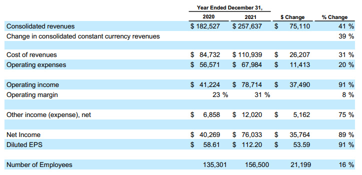
비슷한 모습 이미지 (테이블)를 찾았으며, 이는 주어진 이미지를 기반으로 다양한 수익, 비용, 소득 및 몇 가지 자세한 내용에 대해 자세히 설명합니다. 더 중요한 것은 두 테이블 모두 "수익 비용"과 관련된 숫자를 보여줍니다.
c) 인용을 인쇄하여 그것이 일치하는 것을 볼 수도 있습니다.
print_text_to_image_citation(
matching_results_image,
# Display citation details for the top matching image
print_text_to_image_citation(
    matching_results_image, print_top=True
)  # Print citation details for the top matching image
ㄴ>
Citation 1: Matched image path, page number and page text:

score:  0.99
file_name:  google-10k-sample-part2.pdf
path:  images/google-10k-sample-part2.pdf_image_1_0_13.jpeg
page number:  2
page text:  APAC revenue growth from 2020 to 2021 was favorably affected by foreign
currency exchange rates, primarily due to the U.S. dollar weakening relative to
the Australian dollar, partially offset by the U.S. dollar strengthening relative to
the Japanese yen.
Other Americas growth change from 2020 to 2021 was favorably affected by
changes in foreign currency exchange rates, primarily due to the U.S. dollar
weakening relative to the Canadian dollar, partially offset by the U.S. dollar
strengthening relative to the Argentine peso and the Brazilian real.
Costs and Expenses
Cost of Revenues
The following tables present cost of revenues, including TAC (in millions, except
percentages):
Cost of revenues increased $26.2 billion from 2020 to 2021. The increase was
due to an increase in other cost of revenues and TAC of $13.4 billion and $12.8
billion, respectively.
The increase in TAC from 2020 to 2021 was due to an increase in TAC paid to
distribution partners and to Google Network partners, primarily driven by growth
in revenues subject to TAC. The TAC rate decreased from 22.3% to 21.8% from
2020 to 2021 primarily due to a revenue mix shift from Google Network
properties to Google Search & other properties.
The TAC rate on Google Search & other properties revenues and the TAC rate
on Google Network revenues were both substantially consistent from 2020 to
2021. The increase in other cost of revenues from 2020 to 2021 was driven by

image description:  The image shows a table presenting financial data for the years ended December 31, 2020 and 2021.

Here's the extracted table data:

| Item                                        | 2020    | 2021    |
| ------------------------------------------- | ------- | ------- |
| TAC                                         | 32,778  | 45,566  |
| Other cost of revenues                      | 51,954  | 65,373  |
| Total cost of revenues                      | 84,732  | 110,939 |
| Total cost of revenues as a percentage of revenues | 46.4% | 43.1% |
c-1) 다른 일치하는 이미지 확인
# Check Other Matched Images (Optional)
# You can access the other two matched images using:

print("---------------Matched Images------------------\n")
display_images(
    [
        matching_results_image[0]["img_path"],
        matching_results_image[1]["img_path"],
    ],
    resize_ratio=0.5,
)
ㄴ>
---------------Matched Images------------------

이후 내용은 다음편에
출처
https://www.cloudskillsboost.google/course_templates/981/labs/550043
Inspect Rich Documents with Gemini Multimodality and Multimodal RAG - Vertex AI의 Gemini API를 사용하는 멀티모달 검
이 실습에서는 Vertex AI의 Gemini API를 사용하여 멀티모달 검색 증강 생성(RAG)을 수행하는 방법을 알아봅니다.
www.cloudskillsboost.google
generative-ai/gemini/use-cases/retrieval-augmented-generation/intro_multimodal_rag.ipynb at main · GoogleCloudPlatform/generati
Sample code and notebooks for Generative AI on Google Cloud, with Gemini on Vertex AI - GoogleCloudPlatform/generative-ai
github.com